Templates & Methodology: Admin Configuration
Configure meeting type categories and sales methodology checklists that shape how Qubi analyzes, coaches, and reports on your team's calls.
Meeting type categories
In Settings > Templates under Classification & Tagging:
- View the default meeting categories (Sales Discovery, Demo, Negotiation, QBR, Interview)
- Add custom categories that match your team's workflow
- Edit or remove categories as needed
Qubi uses these categories to automatically classify each meeting after processing.
Sales methodology setup
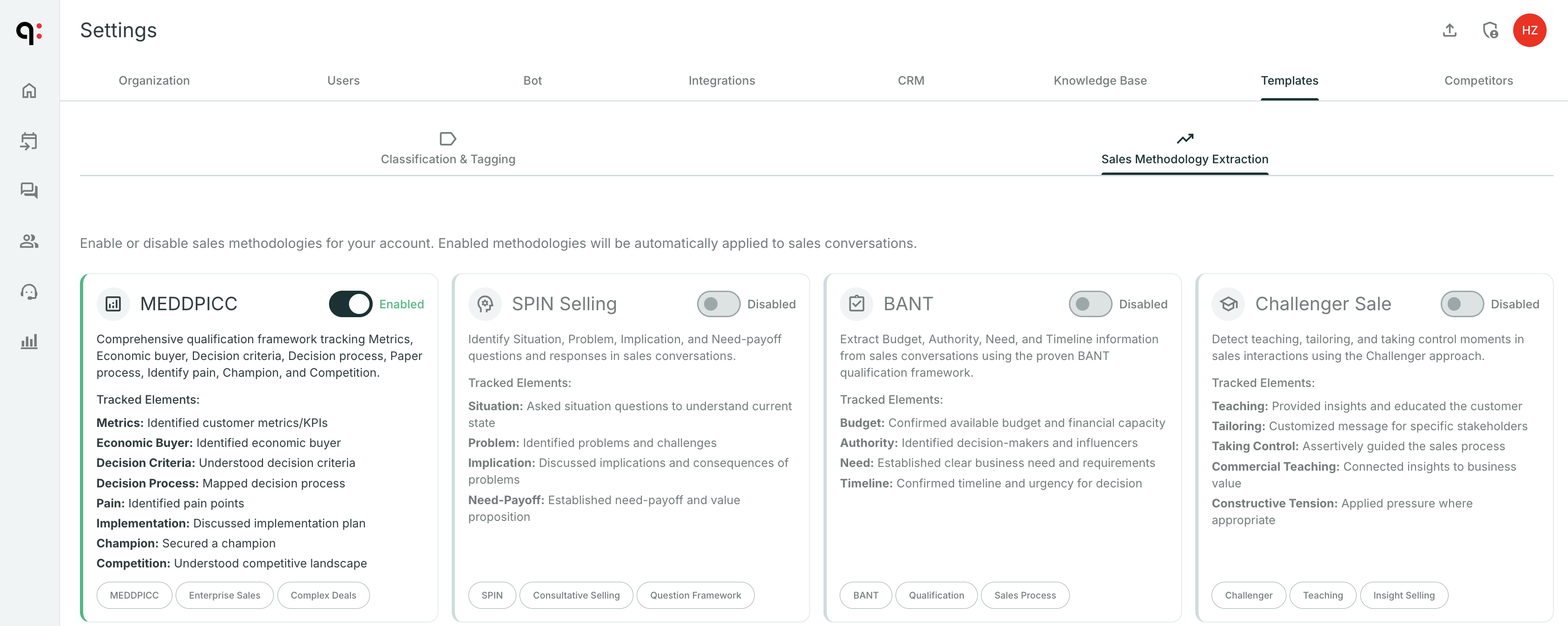
In Settings > Templates under Sales Methodology:
- Enable the methodologies your team uses
- Disable any you don't need
- Set a default methodology that applies to all sales calls
- Customize checklist items: Edit labels, add custom items, reorder
Best practices for admins
- Start with one methodology: Don't overwhelm your team by enabling everything at once
- Customize item labels to use your team's language (e.g., rename "Champion" to "Internal Sponsor" if that's what your team says)
- Review adoption in Team Analytics to see which items reps consistently cover or miss
- Iterate: Add items or adjust based on what your coaching conversations reveal
For a user-focused overview of templates, see Templates & Methodology.