Call Provider Integrations
Beyond meeting platforms (Zoom, Meet, Teams), Qubi integrates with phone call providers and other conversation intelligence tools — Aircall, Gong, Fathom, and Granola — to bring all your conversations into one place.
Connect Aircall
Record and analyze phone calls from Aircall:
- Go to Settings > Integrations
- Click Connect next to Aircall
- Authorize the connection
- Aircall calls will automatically appear in your Conversations library
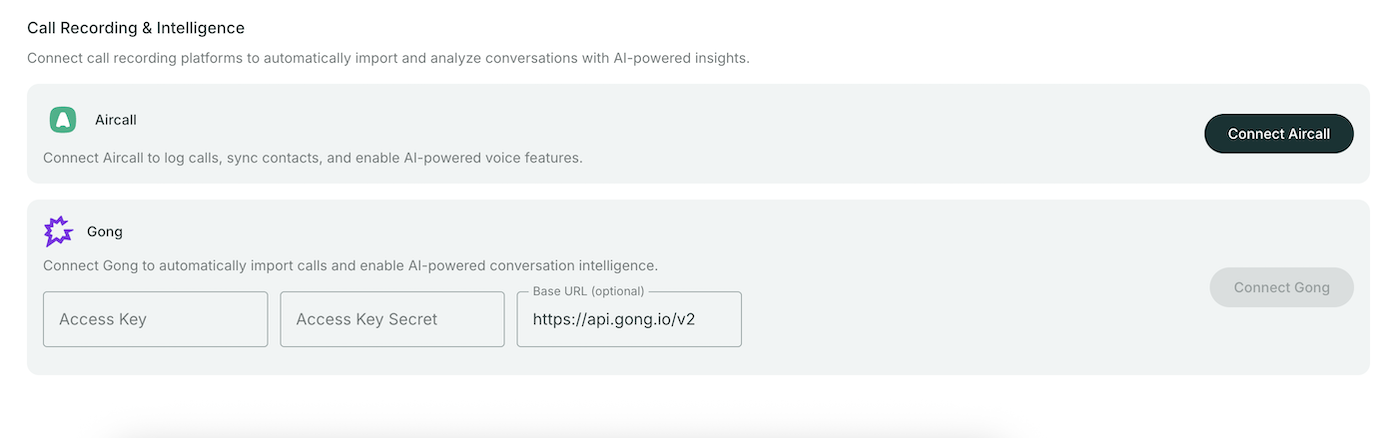
Import from Gong
Migrate your call history from Gong:
- Go to Settings > Integrations
- Under Gong, enter your credentials:
- Access Key
- Secret
- Base URL
- Click Connect
- Your Gong calls will be imported into Qubi
note
Gong import is a one-time migration. Once imported, calls are processed by Qubi and available with full AI analysis.
Import from Fathom
Migrate your call history from Fathom:
- Go to Settings > Integrations
- Under Fathom, enter your credentials:
- API Key
- Base URL (defaults to
https://api.fathom.ai/external/v1)
- Click Connect
- Your Fathom calls will be imported into Qubi
Import from Granola
Migrate your call history from Granola:
- Go to Settings > Integrations
- Under Granola, enter your credentials:
- API Key
- Base URL (defaults to
https://public-api.granola.ai/v1)
- Click Connect
- Your Granola calls will be imported into Qubi